How weight progression works
Barbells can raise the weights stored in your saved plan when you finish a workout. This page describes exactly when that happens, what it changes, and where the rule stops. It explains the product, not how you should train.
What changes, and when
A weight increase changes your saved plan. It does not change the sets you have already logged. The numbers in a finished workout are a record of what you lifted, and Barbells never rewrites them.
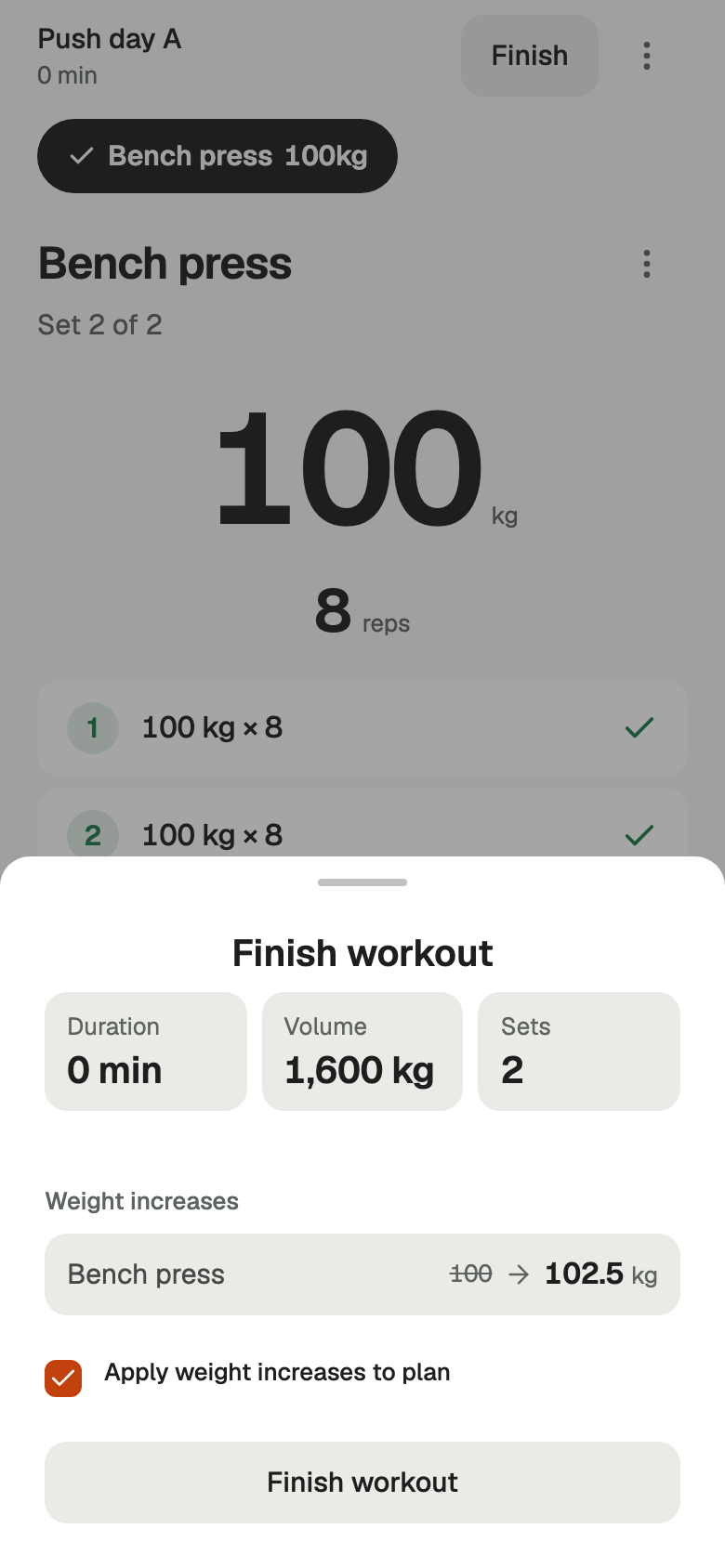
The change is applied at Finish, and only when the Apply weight increases to plan option is left on. Turn it off and the workout is saved exactly as normal, with your plan untouched. Starting a workout changes nothing, and cancelling one changes nothing.
Freestyle workouts have no saved plan behind them, so there is nothing for an increase to update. Progression applies to workouts you started from a plan.
The settings behind an increase
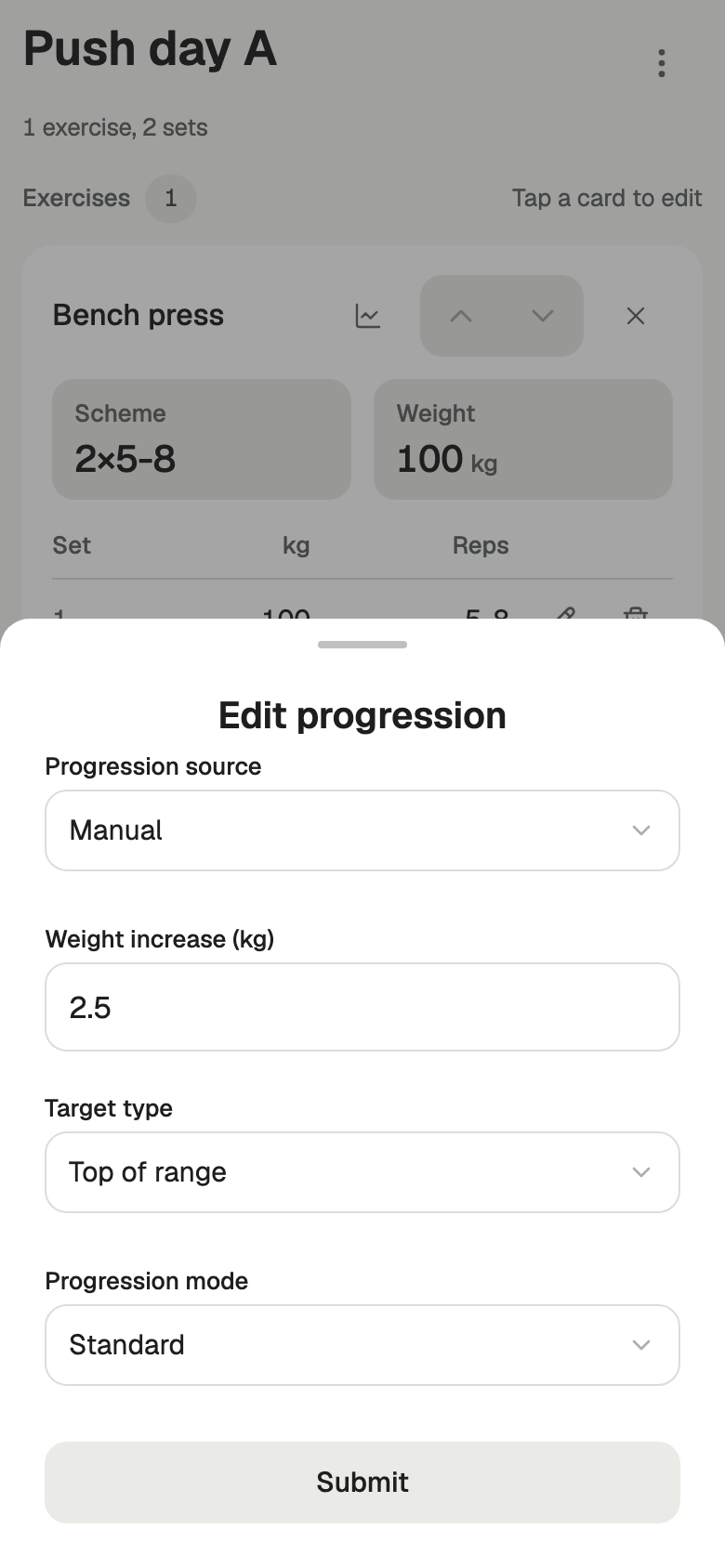
Progression is configured per exercise, inside the plan. These are the settings the two examples below use:
- Progression source
- Manual
- Weight increase
- 2.5 kg
- Target type
- Top of range
- Progression mode
- Standard
- Equipment profile
- None
- Linked exercises
- None
The exercise has two sets in the plan, both at 100 kg, both prescribed 5 to 8 repetitions. Target type is Top of range, so the target for each set is the top of its own range, which is 8.
Two worked examples
Both examples use the settings above. In both, every set is completed and the workout is finished with Apply weight increases to plan left on.
8 and 8 repetitions
Both saved plan sets become 102.5 kg.
Both sets were completed and both reached the target of 8, so the exercise qualifies. In Standard mode the whole exercise moves together, so both plan sets go from 100 kg to 102.5 kg.
8 and 6 repetitions
Both saved plan sets stay at 100 kg.
Both sets were completed, but the second stopped at 6 against a target of 8. With this configuration, where every set uses a repetition range, all of them have to reach their target, so the exercise does not qualify and the plan is left alone.
These are two outcomes of one configuration, not a universal rule. A missed target does not always prevent an increase, and not every set always has to reach its target. The sections below describe the cases where the behaviour differs.
Reviewing increases at Finish
Nothing is applied silently. When you finish a workout that came from a plan, the finish screen lists the increases it proposes under Weight increases, one row per exercise, each showing the current plan weight and the weight it would become. For the first example above, that row reads 100 kg to 102.5 kg. When no exercise qualifies, it says there are no automatic increases this session.
Below the list is the Apply weight increases to plan checkbox. It is on by default for a workout started from a plan. Clear it and the workout is finished without touching the plan. What the preview shows is what gets written, because the preview and the server run the same rules.
Standard and Per-Set
Standard moves the exercise as a whole. Every set you planned has to be completed first; leave one incomplete and nothing increases. When all of those sets use a repetition range, all of them have to reach their target. When they do not all use a range, for example because one set is an AMRAP or has a fixed repetition count, reaching the target on one set is enough. If the exercise qualifies, every plan set for it moves.
Per-Set judges each set on its own. A set that was completed and reached its target moves; a set that was not stays where it is. One qualifying set is enough for the exercise, so after a session you may see some sets move and others hold. The finish preview says so directly, marking the exercise as, for example, 1 of 3 sets.
Repetition targets
Top of range takes the target from each set's own prescription. A set written as 5 to 8 has a target of 8; a set written as 3 to 5 in the same exercise has a target of 5. The targets can differ from set to set.
Fixed reps sets one number that applies to every set in that exercise, whatever range each set is written with. Use it when you want the trigger to be a specific repetition count rather than the top of a range.
Equipment increments and ceilings
Without an equipment profile, a qualifying increase adds the flat amount you configured, so 100 kg with a 2.5 kg increase becomes 102.5 kg.
An equipment profile replaces that with what the equipment can actually do. A profile with a fixed increment adds that increment instead of your flat amount. A profile built from a list of available weights moves to the next weight on the list above the current one, which is why an increase on a machine may be larger than the one you would choose yourself.
A list of weights has a top. Once a set is at the heaviest weight in the profile, a qualifying session produces no increase and the plan holds at that weight. The session still qualifies; there is simply nowhere left to go. The finish preview shows no row for it, because there is no change to make.
Linked exercises
Two exercises in a plan can be linked, so that one earning an increase also moves the other. Barbells does this by applying the qualifying exercise's increase and equipment profile to the linked exercise's own current weights. The linked exercise moves from where it is, not to wherever the first one landed.
An exercise that earned an increase through its own rule keeps it, and no plan set is increased twice in one session however many links point at it.
Where the rule stops
- Progression can be switched off per exercise. An exercise with its progression source set to Off never increases.
- Increases apply to plans. A freestyle workout has no plan behind it, so it has nothing to update.
- Sets you did not complete are not saved with the workout, and an exercise with no completed sets is dropped from it.
- This is bookkeeping for the numbers in your plan. It is not a training programme, it does not judge whether a jump is appropriate for you, and it cannot promise a result.
Logging, and getting started
Progression is the part that happens at Finish. For how a session is actually logged, set by set, see the logging workflow on the home page.
Barbells runs in the browser. It is free for 14 days, and after that it is £2.99 a month or £29.99 a year.